
Ribbon Icons Customizer v1.0
![[(Ei arvosteluja)]](https://cdn.afterdawn.fi/v4/download/rating_0_0.gif)
Ilmainen ohjelma / Freeware
Win8
Win8
Ribbon Icons Customizer can change the icons on the Windows 8 explorer window.
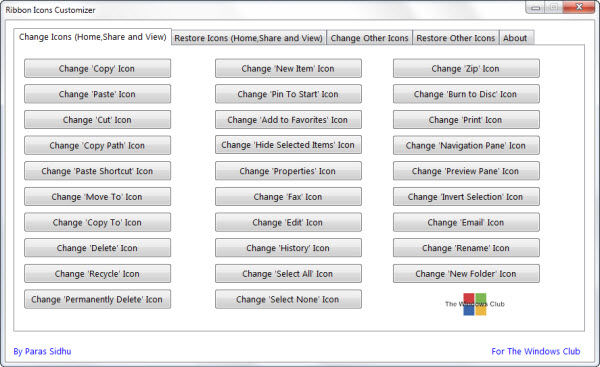
It changes the ribbon icons to something else you would prefer, so for example you can change the copy icon, the paste icon, cut icon, edit icon and so on. You can customize the view of the ribbons on Windows 8 explorer.
To use the Ribbon Icons Customizer, click on the desired button and browse to the the icon on your computer, that you want to replace it with. In the first tab, you can click the respective button of icon which you want to change.
It changes the ribbon icons to something else you would prefer, so for example you can change the copy icon, the paste icon, cut icon, edit icon and so on. You can customize the view of the ribbons on Windows 8 explorer.
To use the Ribbon Icons Customizer, click on the desired button and browse to the the icon on your computer, that you want to replace it with. In the first tab, you can click the respective button of icon which you want to change.
Kuvakaappaukset:
Linkkaa tähän ohjelmaan kopioimalla allaoleva teksti kotisivuillesi:
Lisenssi
Ilmainen ohjelma / Freeware1
Valmistajan kotisivu
Siirry ohjelman kotisivulle
Lisätty
9.12.2015
Latauksia
57
Tiedoston koko
81,60 kB
(<1min @ 1Mbps)
Tuetut kielet
Englanti
Käyttöjärjestelmä(t)
Win81
1Lisenssi- ja käyttöjärjestelmä(t)-kohtien tiedot koskevat ohjelman uusinta versiota.
(Ei arvosteluja)

