
Capture Section Of Screen Software v7.0
![[(Ei arvosteluja)]](https://cdn.afterdawn.fi/v4/download/rating_0_0.gif)
Demoversio
Vista / Win7 / Win8 / WinXP
Vista / Win7 / Win8 / WinXP
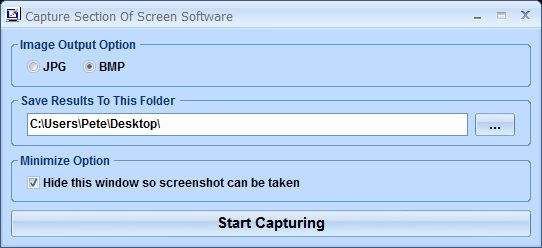
Capture Section Of Screen Software can grab a picture of a section of your screen.
You simply choose the format (JPG or BMP) and the folder for saving the image. One click on the Start Capturing button turns the mouse pointer into an area selection tool.
Simply move the cross to one corner of the area you want to capture, hold down the left mouse button and drag open the selection rectangle to cover the area you want. When you release the mouse button, the image of that screen area is automatically saved.
You simply choose the format (JPG or BMP) and the folder for saving the image. One click on the Start Capturing button turns the mouse pointer into an area selection tool.
Simply move the cross to one corner of the area you want to capture, hold down the left mouse button and drag open the selection rectangle to cover the area you want. When you release the mouse button, the image of that screen area is automatically saved.
Kuvakaappaukset:
Linkkaa tähän ohjelmaan kopioimalla allaoleva teksti kotisivuillesi:
Lisenssi
Demoversio1
Valmistajan kotisivu
Siirry ohjelman kotisivulle
Lisätty
23.11.2016
Latauksia
31
Tiedoston koko
3,05 MB
(<1min @ 1Mbps)
Tuetut kielet
Englanti
Käyttöjärjestelmä(t)
Vista / Win7 / Win8 / WinXP1
1Lisenssi- ja käyttöjärjestelmä(t)-kohtien tiedot koskevat ohjelman uusinta versiota.
(Ei arvosteluja)

